
You are using an out of date browser. It may not display this or other websites correctly.
You should upgrade or use an alternative browser.
You should upgrade or use an alternative browser.
Anyone have a Tech 2 scan tool left over from C5 ownership they want to part with ?
- Thread starter C2 VET
- Start date

C2 VET
CCCUK Member
Okay thanks but I think I need a GM Tech 2 that is capable of cycling my ABS pump to bleed it.
This is the AI description that explains it better than I can.
"The GM Tech 2 is the legendary, factory-level diagnostic scan tool used by General Motors dealerships to service vehicles from 1992 to 2014. Originally manufactured by Vetronix (and later Bosch), authentic vintage units are no longer in production, but highly popular "clone" units are widely used by DIYers and mechanics today"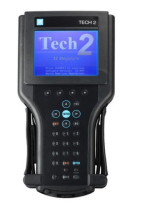
This is the AI description that explains it better than I can.
"The GM Tech 2 is the legendary, factory-level diagnostic scan tool used by General Motors dealerships to service vehicles from 1992 to 2014. Originally manufactured by Vetronix (and later Bosch), authentic vintage units are no longer in production, but highly popular "clone" units are widely used by DIYers and mechanics today"

teamzr1
Supporting vendor
Found it, Actron cp9135 obd11 .
That model is mostly a basic DTC code reader and does not do service functions
teamzr1
Supporting vendor
Okay thanks but I think I need a GM Tech 2 that is capable of cycling my ABS pump to bleed it.
This is the AI description that explains it better than I can.
"The GM Tech 2 is the legendary, factory-level diagnostic scan tool used by General Motors dealerships to service vehicles from 1992 to 2014. Originally manufactured by Vetronix (and later Bosch), authentic vintage units are no longer in production, but highly popular "clone" units are widely used by DIYers and mechanics today"
The GM Tech II would require that it is loaded with the software for your year and model
If not than you have to pay a service of GM's to obtain that software and load the Tech II to
be able to use it on your C5
The service is not cheap but does allow for shorter timeframes of use
One way is a cheap costing scanner that is biased for GM vehicles
This one I have and just checked it for my C5 and the ABS/brake bleeder function does exist
Cost $149 US at :
Loading...
www.amazon.com
Allows free software updates
AUTOPHIX 7210P+ OBD2 Scanner for GM with All Reset Services
| Fit for GM/Chevy/Buick/Cadillac. Support all system scan and all maintenance service. | |
| Operating System | gm scanner - full system and all service |

Steven Smith
CCCUK Member
Do you definitely need a Tech 2 ?Anyone have a Tech 2 scan tool left over from C5 ownership they want to part with ?
Doesn't a C5 have a standard OBD 2 port?
Would a vehicle specific OBD 2 scanner work, I know a C5 owner that used a Autel AP200 to calibrate the steering sensor and it works fine, they are only around £50 and you "lock it" to a vehicle manufacturer on first use.
You can asked Autel if it will do what you want via their website.
I have a all makes / all model vehicle scanner we can try if your near Essex. I does ABS bleeding and lists GM in the vehicle selection
C2 VET
CCCUK Member
Thanks for the replies,
Steven: I don't specifically need a Tech 2, I need a scanner that has hot functions that you need to cycle the ABS pump to bleed it properly.
I'll look into the Autel AP200, I'm in North Norfolk.
I'll also look into the Autophix scanner that you mentioned teamZR1 thanks.
When you say the Tech2 needs to be loaded with software, would that be the 32 bit card that is supplied by some sellers ?
Steven: I don't specifically need a Tech 2, I need a scanner that has hot functions that you need to cycle the ABS pump to bleed it properly.
I'll look into the Autel AP200, I'm in North Norfolk.
I'll also look into the Autophix scanner that you mentioned teamZR1 thanks.
When you say the Tech2 needs to be loaded with software, would that be the 32 bit card that is supplied by some sellers ?
Steven Smith
CCCUK Member
Also look at the Mucar range of diagnostic scanners as they have two way communication with the carThanks for the replies,
Steven: I don't specifically need a Tech 2, I need a scanner that has hot functions that you need to cycle the ABS pump to bleed it properly.
I'll look into the Autel AP200, I'm in North Norfolk.
I'll also look into the Autophix scanner that you mentioned teamZR1 thanks.
When you say the Tech2 needs to be loaded with software, would that be the 32 bit card that is supplied by some sellers ?
Steven Smith
CCCUK Member
I will take my scanner to a American car show tomorrow and see if a willing club member will let me plug it into their car and see what functionality is available.
And let you know tomorrow, it was less than £200 because it's wired and not Bluetooth.
And let you know tomorrow, it was less than £200 because it's wired and not Bluetooth.
C2 VET
CCCUK Member
Thanks Steven that's very good of you to do that.I will take my scanner to a American car show tomorrow and see if a willing club member will let me plug it into their car and see what functionality is available.
And let you know tomorrow, it was less than £200 because it's wired and not Bluetooth.

Invetterate
CCCUK Member
You can try it on my C5, SteveI will take my scanner to a American car show tomorrow and see if a willing club member will let me plug it into their car and see what functionality is available.
And let you know tomorrow, it was less than £200 because it's wired and not Bluetooth.

Steven Smith
CCCUK Member
A willing victim / volunteerYou can try it on my C5, Steve

teamzr1
Supporting vendor
C5 Automated Bleed Procedure
First perform a manual or pressure bleeding procedure. If the desired brake pedal height results are not achieved, perform the auto bleed procedure below.The auto bleed procedure is used on Delco Bosch 5 equipped vehicles.
The procedure cycles the system valves and runs the pump in order to purge the air from the secondary circuits normally closed off during non Antilock Brake System/Traction Control System (ABS/TCS) mode operation and bleeding. The auto bleed procedure is recommended when air ingestion is suspected in the secondary circuits, or when the Brake Pressure Modulator Valve (BPMV) has been replaced.
Items Required
^ A Scan tool
^ A 30 psi adapter equipped brake bleeder
^ Delco Supreme II brake fluid
^ A hoist
^ An unbreakable plastic bleeder bottle equipped with a hose
^ An assistant
^ The suitable safety attire, including safety glasses
AUTO BLEED PROCEDURE
NOTICE: The Auto Bleed Procedure may be terminated at any time during the process by pressing the EXIT button.
No further Scan tool prompts pertaining to the Auto Bleed procedure will be given.
After exiting the bleed procedure, relieve bleed pressure and disconnect bleed equipment per manufacturers instructions. Failure to properly relieve pressure may result in spilled brake fluid causing damage to components and painted surfaces.
1. Raise the vehicle on a suitable support.
2. Remove all four tire and wheel assemblies.
3. Inspect the brake system for the following conditions. Repair or replace as needed:
^ Leaks
^ Visual damage
4. Inspect the battery state of charge.
5. Connect the Scan tool to the Data Link Connector (DLC).
6. Turn the ignition to ON position with the engine off.
7. Using the Scan tool, establish communications with the ABS/TCS system.
Select the following features:
^ ABS/TCS
^ Special Functions
^ AUTOMATED BLEED PROCEDURE
8. Bleed the basic brake system.
9. Follow the Scan tool directions until the desired brake pedal height is achieved.
10. If the bleed procedure is aborted, a malfunction exists. Perform the following steps before resuming the bleed procedure:
^ If a Diagnostic Trouble Code (DTC) is detected, refer to the appropriate DTC table.
^ If the brake pedal feels spongy, perform the conventional brake bleed procedure again.
11. When the desired pedal height is achieved, press the brake pedal in order to inspect for firmness.
12. Disconnect the Scan tool.
13. Install the tire and wheel assemblies.
14. Inspect the brake fluid level.
15. Road test the vehicle while making sure the brake pedal remains high and firm.
Invetterate
CCCUK Member
I'll just check my AA cover......A willing victim / volunteer
Steven Smith
CCCUK Member
Tested my scanner and it recognised a C5 and did a full system scan.Thanks Steven that's very good of you to do that.
I didn't try any of the special functions as didn't want to do anything to Invetterate's car, but it did list ABS bleeding was available.
Invetterate
CCCUK Member
You are very welcome! Hope you get it sorted 